


NextStop Blog
Rider’s Guide: Tap & Ride and Fare Capping
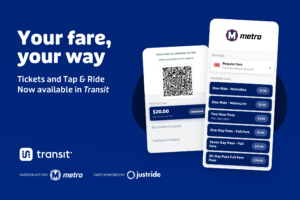
Return to BlogMetro is giving riders more options than ever to manage fare, making it easier to ride and save. The most exciting new feature offered by Metro Transit is Tap & Ride.
Why use Tap & Ride?
With Tap & Ride, you pay for your fare when boarding with a simple tap of your phone or Ride On card using an easy-to-manage balance. That means you no longer have to worry about buying tickets or passes. Tap & Ride includes Fare Capping, which caps how much you spend on fare at the price of any pass, so you always get the best deal.
About Tap & Ride
- Tap & Ride is available as a tool in the Transit app or on the Ride On card.
- You upload funds to a Tap & Ride balance, which you use to pay your fare when you board.
- Tap & Ride eliminates the need to buy individual tickets or passes.
About Fare Capping
- Fare Capping works automatically when you use Tap & Ride on the Transit app or Ride On card.
- What you pay with Tap & Ride is capped at the cost of the pass that would have been the best deal for you, including 1-Day, 7-Day, and 30-Day passes. For example, once you reach the total for a 7-Day pass over the course of a week using Tap & Ride, you won’t be charged more.
- Because of Fare Capping, you no longer have to worry about being able to afford or whether you’ll ride enough to warrant the price of a 7-Day or 30-Day pass.
How to Set Up Tap & Ride
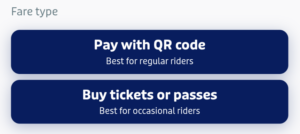
To use Tap & Ride on the Transit app, make sure you log into or create an account on the app. Then, when you click to purchase tickets, select the “Pay with QR code” option to set up Tap & Ride. Then, you’ll be able to upload funds to your balance and use a QR code to scan at the validators when boarding.
To use Tap & Ride with a Ride On card, upload a Tap & Ride balance to your card at a TVM or link it to an account at MetroStLouis.org/MyTickets to add a balance online. Through MetroStLouis.org/MyTickets, you can also link your Ride On card to your Transit app.
Soon, riders will also be able to use Tap & Ride in the Ride On app or link their Ride On card to the Ride On app as another option for managing fare. Metro will announce once these features are officially ready for the Ride On app.
 Categories: